分类 机器学习 下的文章

基本概念

  • DBSCAN:Density-Based Spatial Clustering of Applications with Noise (具有噪声的基于密度的聚类方法)
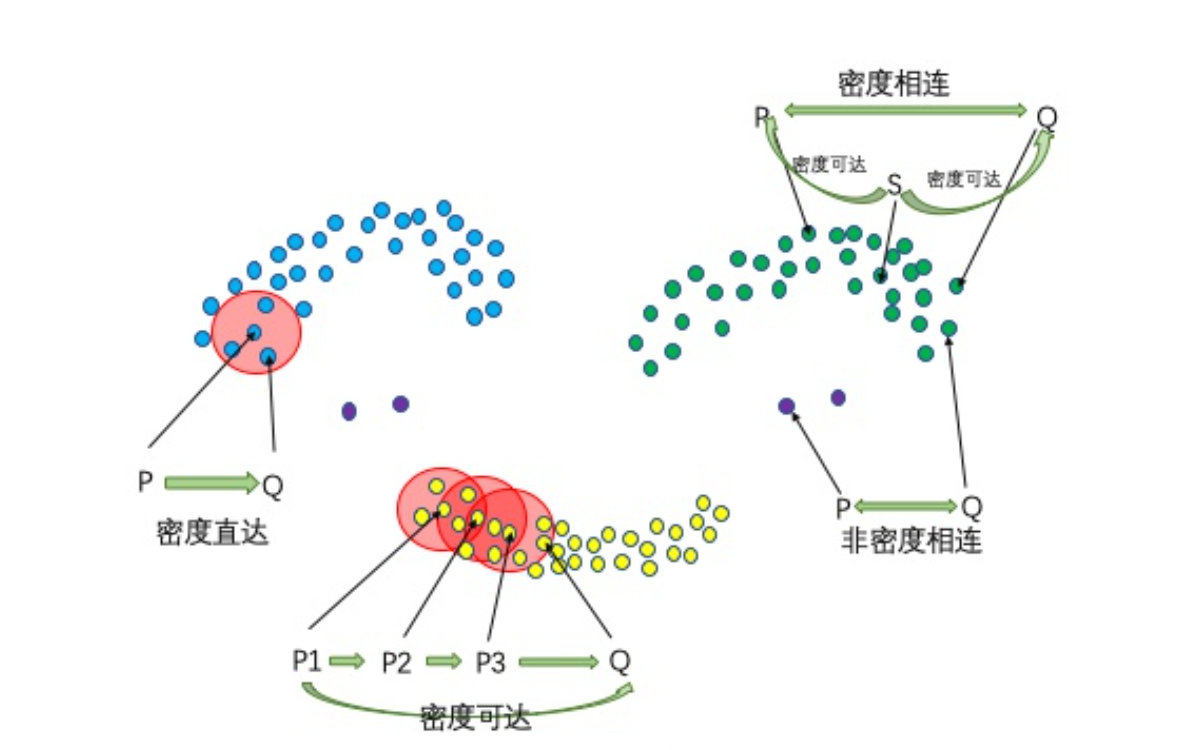
  • 核心对象:若某个点内的密度达到算法设定的阈值则为核心点
  • ∈-邻域的距离阈值:设定的半径r
  • 直接密度可达:若点p在点q的r邻域内,且q是核心点则p-q直接密度可达
  • 密度可达:若有一个点的序列$q_0,q_1,...,q_k$,对任意$q_i,q_{i-1}$直接密度可达,那么称$q_0,q_k$密度可达。即直接密度可达的‘传播’。
  • 密度相连:若从核心点p出发,点q和点k都是密度可达的。那么点q和点k是密度相连的。(不要求q/k必须是核心点)
  • 边界点:属于某个类的非核心点
  • 噪声点:不属于任何一个类簇的点,从任何一个核心点出发都是密度不可达的。

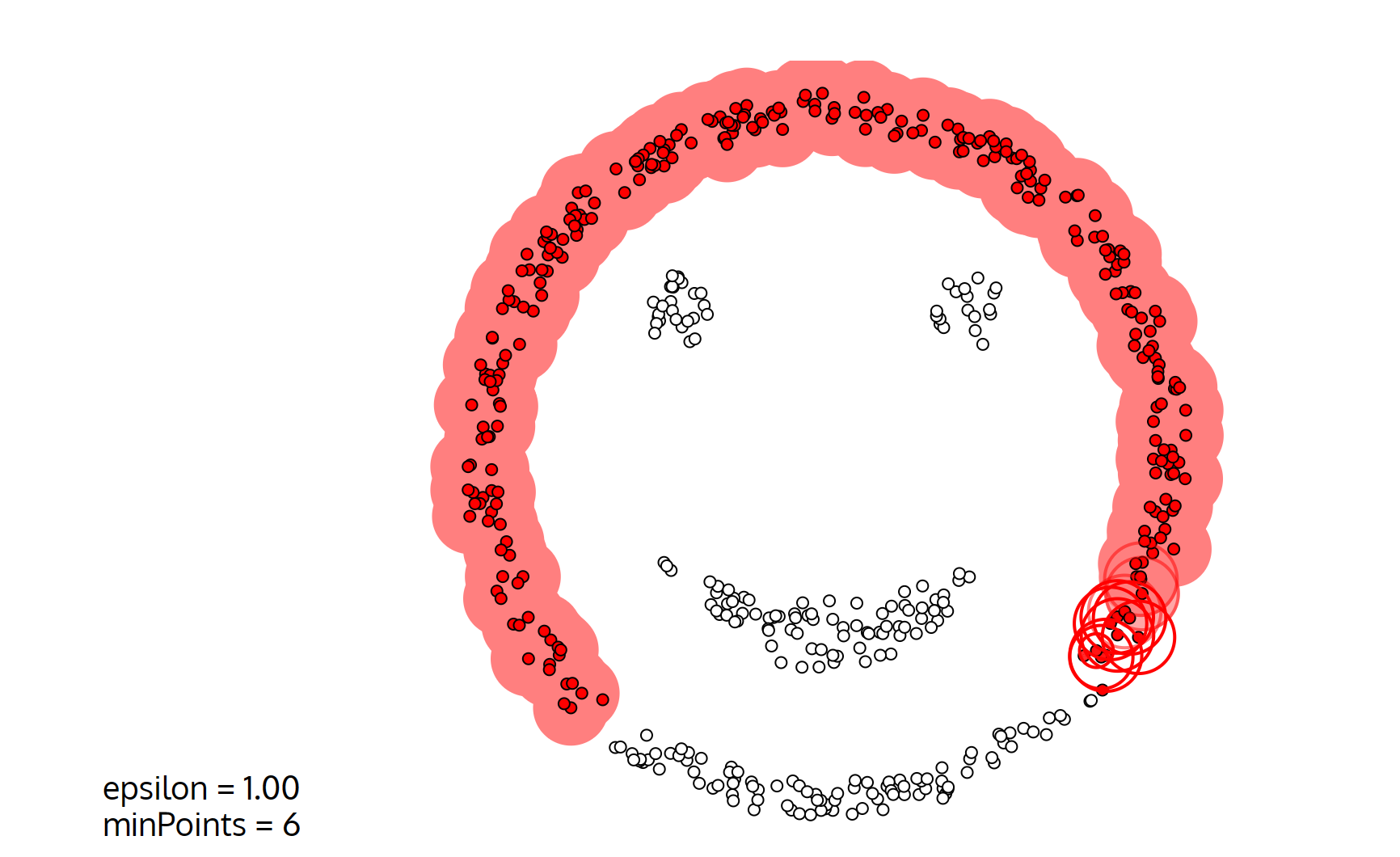
image-20230327144445160

参数选择

  • 半径∈:可以根据K距离设定,即寻找突变点。
  • K距离:给定数据集P = {p(i);i=0,1,...,n},计算点p(i)到集合D的子集S中所有点之间的距离d,按照距离从小到大排序,d(k)即K距离

    例如点s到其他点的距离数组$d_k$={0.1,0.11,0.12,0.3,0.5....}(已排序),发现前三个距离相差不大,第四个距离0.3发生突变,那么半径取d(3)=0.12,MinPts取3
  • MinPts:K-距离中的K值,一般从小开始取

优缺点

优点:

  • 可以处理任意形状的簇
  • 不需要指定簇的个数
  • 擅长找到离群点,用于异常检测任务

缺点:

  • 高维数据处理困难(可以寻找降维方法)
  • 半径r和MinPts难以确定
  • 算法效率慢

算法流程

伪代码如下,类似宽度优先搜索进行簇的传播:

bool visited[n];
memset(visited,false,sizeof visited);
while(some point is unvisited){
    choose p randomly which is unvisited;
    if(p ∈-field has more that MinPts points){
        create a new cluster C;
        N = {q in p ∈-field};
        for(auto &q:N){
            if(visited[q]==false){
                visited[q] = true;
                if(q ∈-field has more that MinPts points){
                    add {k in q ∈-field} to N;
                }
                add q to cluster C;
            }
        }
    }else{
        add p to noise;
    }
}

可视化

Visualizing DBSCAN Clustering (naftaliharris.com)

image-20230327150826761

sklearn

from sklearn.cluster import DBSCAN
dbscan = DBSCAN(eps=0.5,min_sample=5)
dbscan.fit(X)    # train
dbscan.label_   # label label=-1 means noise
descan.core_sample_indices_ # 核心样本在原始训练集中的位置

聚类概念

  • 属于无监督学习(无标签)
  • 顾名思义,就是将相似的东西分到一组
  • 难点在于如何评估聚类效果以及调整参数

基本概念

  • K代表最后需要得到的簇个数(比如二分类K=2)
  • 一个簇的质心计算:采用均值,即每个特征向量取平均值
  • 距离度量:经常使用欧几里得距离余弦相似度(高维特征最好先执行一次标准化)
  • 优化目标:实现$min\sum_{i=1}^{k}\sum_{x∈C_i}dist(C_i,x)^2$

优缺点

优点:

  • 算法简单、快速
  • 适合常规数据集(就是一坨一坨的那种,没有特定形状)

缺点:

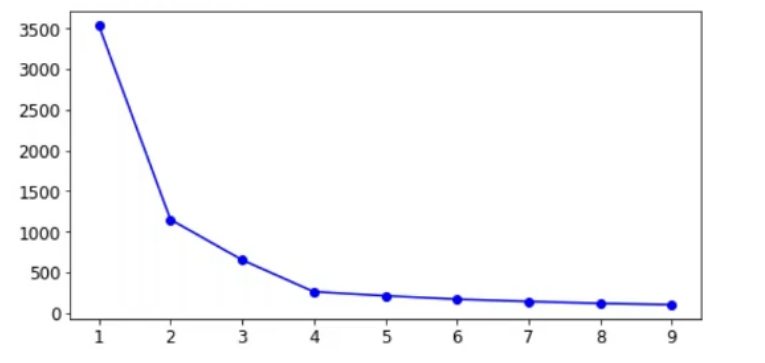
  • K值难以确定(一般是遍历K值取Inertia的拐点)
  • 算法复杂度与样本呈线性关系(一次迭代)
  • 很难发现任意形状的簇,比如二维特征的样本,一个圆环套一个球的形状KMeans就很难检测出来。

image-20230327102339790

算法流程

  • 首先随机选取K个样本作为K个簇的中心(在KMeans++中,使用最大距离进行初始化)

    • KMeans++逐个选取K个簇中心,且离其它簇中心越远的样本点越有可能被选为下一个簇中心
  • 将每个样本分配到K个簇中,具体选择哪个簇取决于该样本和K个簇的距离,选择距离最近的簇(分配样本)
  • 此时所有样本都分配到对应的簇,在每个簇中更新簇中心。新的簇中心采用简单的均值计算(更新簇中心)
  • 回到第二步再次分配样本,直到达到迭代次数上限损失指标小于某个阈值(损失指标有inertia/轮廓系数)

KMeans代码实现

import numpy as np
class KMeans:
    def __init__(self,data,num_clusters):
        self.data = data
        self.num_clusters = num_clusters
        
    def train(self,max_iterations):
        # 1.choose k centers
        centroids = KMeans.centroids_init(self.data,self.num_clusters)
        # 2.begin train
        num_examples = self.data.shape[0]
        closest_centroids_ids = np.empty((num_examples,1))
        for _ in range(max_iterations):
            # 3.get closest center id
            closest_centroids_ids = KMeans.centroids_find_closest(self.data,centroids)
            # 4.update k centers
            centroids = KMeans.centroids_compute(self.data,closest_centroids_ids,self.num_clusters)
        return centroids,closest_centroids_ids
    
    @staticmethod
    def centroids_init(self,data,num_clusters):
        num_examples = data.shape[0]
        random_ids = np.random.permutation(num_examples)
        centroids = data[random_ids[:num_clusters],:]
        return centroids
    
    @staticmethod
    def centroids_find_closest(self,data,entroids):
        num_examples = data.shape[0]
        num_centroids = centroids.shape[0]
        closest_centroids_ids = np.zeros((num_examlpes,1))
        for example_index in range(num_examples):
            distance = np.zeros(num_centroids,1)
            for centroid_index in range(num_centroids):
                distance_diff = data[example_index,:] - centroids[centroid_index,:]
                distance[centroid_index] = np.sum(distance_diff**2)
            closest_centroids_ids[example_index] = np.argmin(distance)
        return closest_centroids_ids
    
    @staticmethod
    def centroids_compute(self.data,closest_centroids_ids,self.num_clusters):
        num_features = data.shape[1]
        centroids = np.zeros((num_clusters,num_features))
        for centroid_id in range(num_clusters):
            closest_ids = closest_centroids_ids == centroid_id
            centroids[centroid_ids] = np.mean(data[closest_ids.flatten(),:],axis=0)
        return centroids

sklearn

接下来介绍sklearn库中的KMeans实现.

文档见sklearn.cluster.KMeans — scikit-learn 1.2.2 documentation

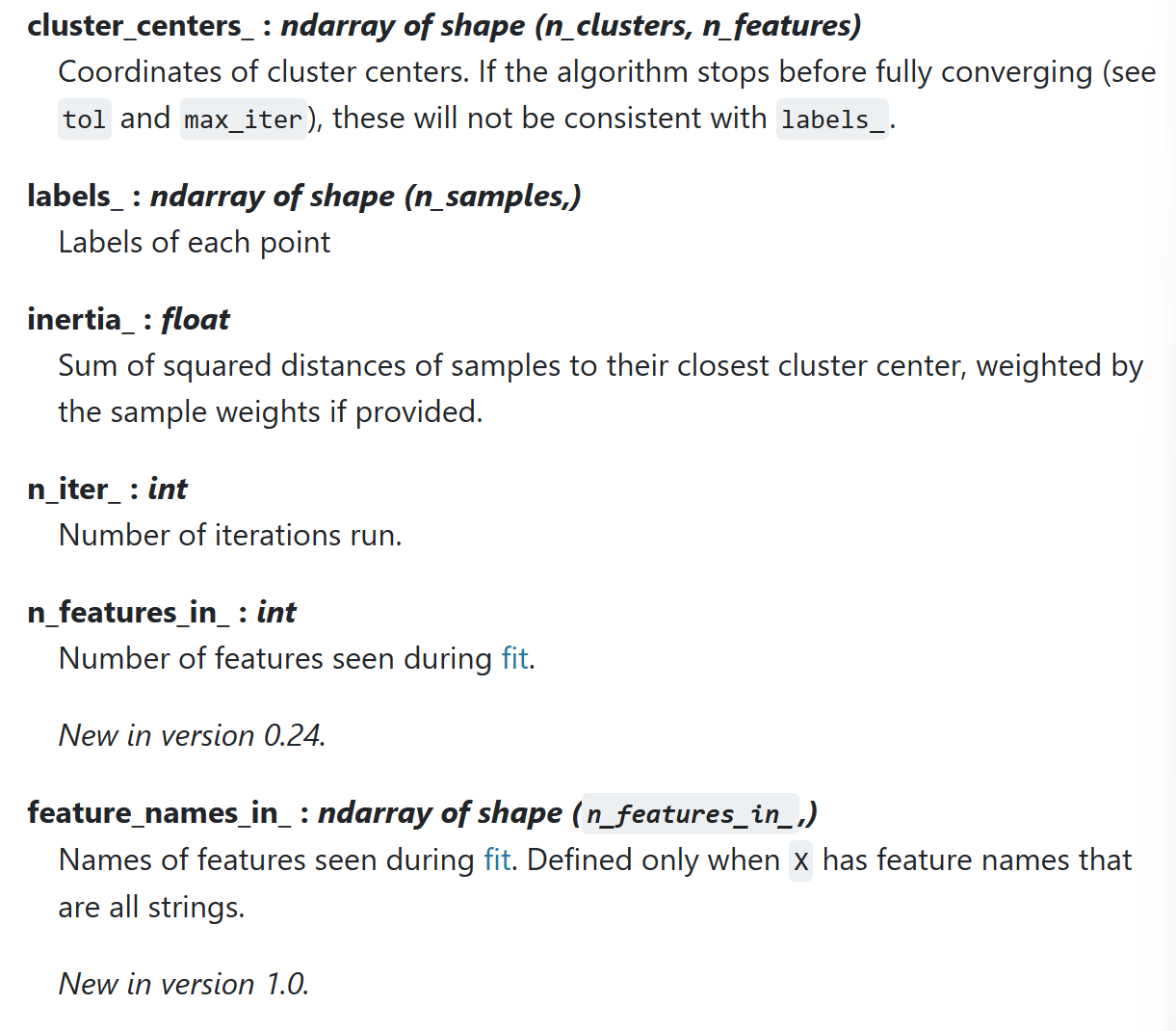
Attributes

image-20230327110345259

__init__

  • n_clusters : 簇个数K
  • random_state : 随机数种子
  • init : K个簇中心的初始化方式
  • n_init : 算法执行次数,取结果最好的一次
  • max_iter : 单次算法迭代次数(分配簇/更新簇)
from sklearn.cluster import KMeans
kmeans = KMeans(n_clusters=2,random_state=0,init='k-means++',n_init=10,max_iter=300)

fit

kmeans.fit(X) # input X
kmeans.cluster_centers_ # center coordinate
kmeans.label_ # every sample's label
kmeans.inertia # loss

pred

kmeans.predict(New_X)
kmeans.label_

tranform

Transform(): Method using these calculated parameters apply the transformation to a particular dataset.

返回值shape : (num_examples,num_clusters) 即每个样本和每个类的距离 通过这个方法也可以得到predict结果(argmin)

from sklearn.preprocessing import StandardScaler
sc = StandardScaler()
sc.fit_tranform(X_train)
sc.tranform(X_test) # 一定是tranform 保证train和test使用同一个转化标准

可视化

# draw cluster points
def plot_data(feature,snr,label):
    df = pd.DataFrame(dict(x=snr, y=feature, color=label))
    fig, ax = plt.subplots()
    colors = {0:'red', 1:'blue'}
    ax.scatter(df['x'], df['y'], c=df['color'].apply(lambda x: colors[x]))
    plt.show()

# draw cluster centers
def plot_centriods(snr,centroids,weights=None,circle_color='g',cross_color='k'):
    if weights is not None:
        centroids = centroids[weights>weights.max()/10]
    plt.scatter(snr,centroids[:],
               marker='o',s=30,linewidths=8,
               color=circle_color,zorder=10,alpha=0.9)
    plt.scatter(snr,centroids[:],
               marker='x',s=50,linewidths=50,
               color=circle_color,zorder=11,alpha=1)

评估指标

inertia指标

inertia : 每个样本距离质心的距离

score方法的结果是inertia的负值(绝对值越大分数越小)

kmeans.inertia_
X_dist = kmeans.transform(X)
np.sum(X_dist[np.arange(len(X_dist)),kmeans.labels_]**2) # inertia计算
kmeans.score(X) == -1*kmeans.inertia_

轮廓系数

某个样本的轮廓系数定义为:

$$ s = \frac {disMean_{out} - disMean_{in}}{max(disMean_{out}-disMean_{in})} $$

其中$disMean_{in}$为该点与本类其他点的平均距离,$disMean_{out}$为该点与非本类点的平均距离。该值取值范围为[−1,1], 越接近1则说明分类越优秀。在sklearn中函数 silhouette_score() 计算所有点的平均轮廓系数,而silhouette_samples()返回每个点的轮廓系数。

K值选取(拐点法)

kmeans_per_k = [KMeans(n_clusters=k).fit(X) for k in range(1,10)]
inertias = [model.inertia_ for model in kmeans_per_k]
# draw fig
plt.figure(figsize=(8,4))
plt.plot(range(1,10),inertias,'bo-')
plt.show()

image-20230327114805748

半监督学习

KMeans也可以用于半监督学习

比如在一个少样本训练场景下,相比于随机选取50个训练样本打标加入训练这种方式,可以先使用聚类挑出50个簇中心,每个簇选取一个样本作为典型样本;用这些样本打标训练,最后测试出来的acc会更高。除此之外,还可以通过标签传播(同一个簇内的标签一致)的方式扩大训练集。

数据表示

一般来说字符串数据分为四种:

  • 分类数据
  • 可以在语义上映射维类别的自由字符串
  • 结构化字符串数据
  • 文本数据

词袋表示

这种表示舍弃了输入文本中的大部分结构,如段落、章节、句子和格式,只计算每个单词在每个文本中的出现频次

计算词袋有以下步骤:

  • 分词(tokenization):将每个文档划分为出现在其中的单词,按空格和标点划分。
  • 构建词表(vocabulary building):收集词表,包含出现在任意文档的所有词。
  • 编码(encoding):对于每个文档,计算每个单词在文档中的出现频次。(稀疏矩阵存储)
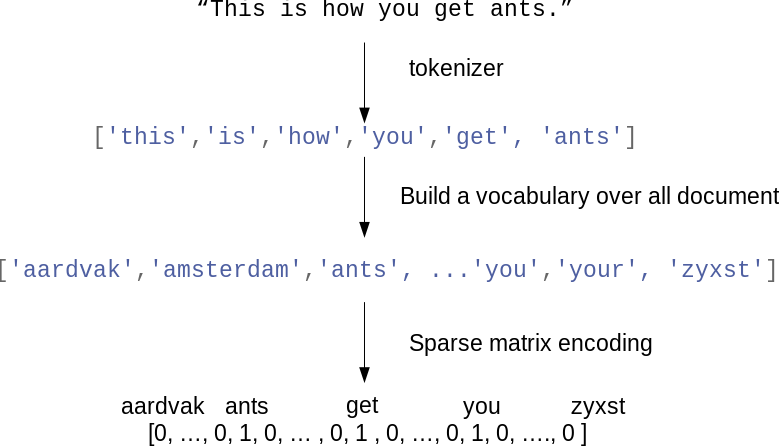
bag_of_words

CountVectorizer

  • 简单使用
from sklearn.feature_extraction.text import CountVectorizer
vect = CountVectorizer()
vect.fit(bard_words) # train
len(vect.vocabulary_)
vect.vocabulary_
bag_of_words = vect.transform(bard_words) # 词袋表示使用稀疏矩阵存储
bag_of_words.toarray() # 转换成array可视化
  • 改进单词提取

CountVectorizer使用正则表达式进行分词 "\b\w\w+\b"

指定min_df可以减少特征量,仅使用至少在min_df个文档出现的单词

vect = CountVectorizer(min_df=5).fit(text_train)
X_train = vect.transform(text_train)
feature_names = vect.get_feature_names() # get feature name
  • 删除停用词
指定stop_words字段
vect = CountVectorizer(min_df=5,stop_words="english").fit(text_train)
X_train = vect.transform(text_train)

TfidfVectorizer

tf-idf方法

tf-idf即词频-逆向文档频率,这种方法对于在某个特定文档经常出现的术语给予很高的权重,对于在语料库中的不同文档经常出现的术语给予较低的权重,因此高权重的术语更有可能概括整个文档的内容.

$$ tfidf(w,d) = tf \log (\frac {N+1}{N_w+1})+1 $$

sklearn

  • 结合logisticsRegression进行情感预测
from sklearn.feature_extraction.text import TfidfVectorizer
from sklearn.pipeline import make_pipeline
pipe = make_pipeline(TfidfVectorizer(min_df=5, norm=None),
                     LogisticRegression())
param_grid = {'logisticregression__C': [0.001, 0.01, 0.1, 1, 10]}

grid = GridSearchCV(pipe, param_grid, cv=5)
grid.fit(text_train, y_train)
print("Best cross-validation score: {:.2f}".format(grid.best_score_))
  • 查看tfidf产生的权重
vectorizer = grid.best_estimator_.named_steps["tfidfvectorizer"]
# transform the training dataset:
X_train = vectorizer.transform(text_train)
# find maximum value for each of the features over dataset:
max_value = X_train.max(axis=0).toarray().ravel()
sorted_by_tfidf = max_value.argsort()
# get feature names
feature_names = np.array(vectorizer.get_feature_names())

print("Features with lowest tfidf:\n{}".format(
      feature_names[sorted_by_tfidf[:20]]))

print("Features with highest tfidf: \n{}".format(
      feature_names[sorted_by_tfidf[-20:]]))
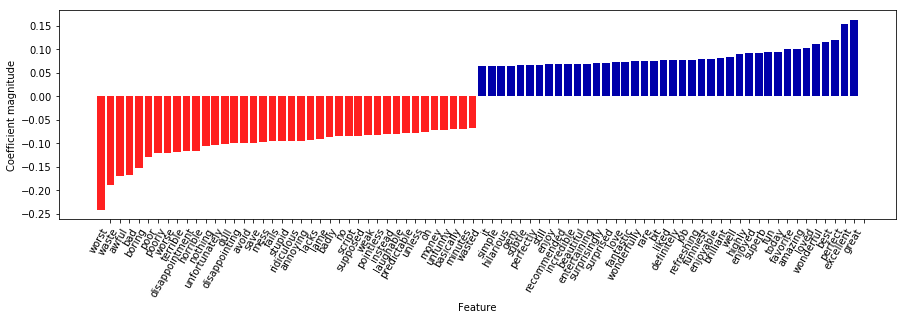
  • 查看回归模型的参数
mglearn.tools.visualize_coefficients(
    grid.best_estimator_.named_steps["logisticregression"].coef_,
    feature_names, n_top_features=40)
下载

N元分词

n元分词可以保存句子的结构信息.n个词例可以组成一个n-gram.

  • 一元分词
cv = CountVectorizer(ngram_range=(1, 1)).fit(bards_words)
print("Vocabulary size: {}".format(len(cv.vocabulary_)))
print("Vocabulary:\n{}".format(cv.get_feature_names()))

image-20230328011909671

  • 二元分词
cv = CountVectorizer(ngram_range=(2, 2)).fit(bards_words)
print("Vocabulary size: {}".format(len(cv.vocabulary_)))
print("Vocabulary:\n{}".format(cv.get_feature_names()))

image-20230328011921460

  • 三元分词
cv = CountVectorizer(ngram_range=(1, 3)).fit(bards_words)
print("Vocabulary size: {}".format(len(cv.vocabulary_)))
print("Vocabulary:\n{}".format(cv.get_feature_names()))
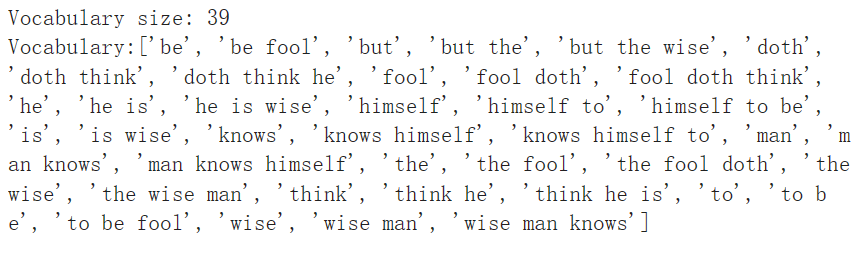
image-20230328011954677

  • 热力图表示
# extract scores from grid_search
scores = grid.cv_results_['mean_test_score'].reshape(-1, 3).T
# visualize heat map
heatmap = mglearn.tools.heatmap(
    scores, xlabel="C", ylabel="ngram_range", cmap="viridis", fmt="%.3f",
    xticklabels=param_grid['logisticregression__C'],
    yticklabels=param_grid['tfidfvectorizer__ngram_range'])
plt.colorbar(heatmap)
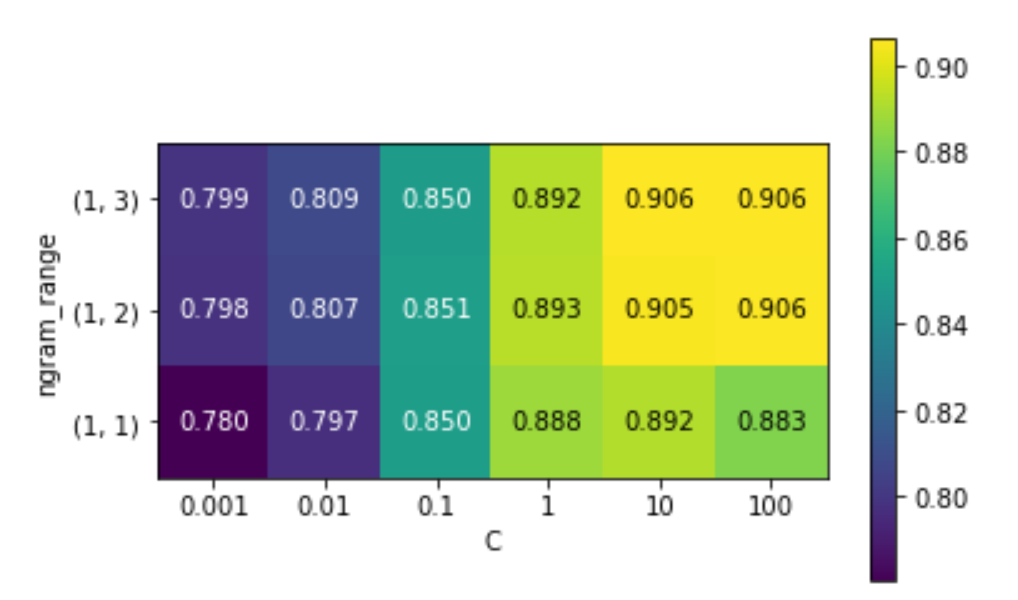
image-20230328012045341

高级分词/词干提取/词形还原

词干提取/词形还原都属于normalization.使用Porter进行词干提取,使用spacy包实现词形还原

import spacy
import nltk

# load spacy's English-language models
en_nlp = spacy.load('en')
# instantiate nltk's Porter stemmer
stemmer = nltk.stem.PorterStemmer()

# define function to compare lemmatization in spacy with stemming in nltk
def compare_normalization(doc):
    # tokenize document in spacy
    doc_spacy = en_nlp(doc)
    # print lemmas found by spacy
    print("Lemmatization:")
    print([token.lemma_ for token in doc_spacy])
    # print tokens found by Porter stemmer
    print("Stemming:")
    print([stemmer.stem(token.norm_.lower()) for token in doc_spacy])

image-20230328013605939

主题建模和文档聚类

使用隐含迪利克雷分布(LDA)进行主题建模.

vect = CountVectorizer(max_features=10000, max_df=.15)
X = vect.fit_transform(text_train)

from sklearn.decomposition import LatentDirichletAllocation
lda = LatentDirichletAllocation(n_topics=10, learning_method="batch",
                                max_iter=25, random_state=0)
# We build the model and transform the data in one step
# Computing transform takes some time,
# and we can save time by doing both at once
document_topics = lda.fit_transform(X)
  • LDA的components_属性
print("lda.components_.shape: {}".format(lda.components_.shape))
# lda.components_.shape: (10, 10000) 即每个单词对于每个主题的重要性
  • LDA重要性可视化
# for each topic (a row in the components_), sort the features (ascending).
# Invert rows with [:, ::-1] to make sorting descending
sorting = np.argsort(lda.components_, axis=1)[:, ::-1]
# get the feature names from the vectorizer:
feature_names = np.array(vect.get_feature_names())
# Print out the 10 topics:
mglearn.tools.print_topics(topics=range(10), feature_names=feature_names,
                           sorting=sorting, topics_per_chunk=5, n_words=10)
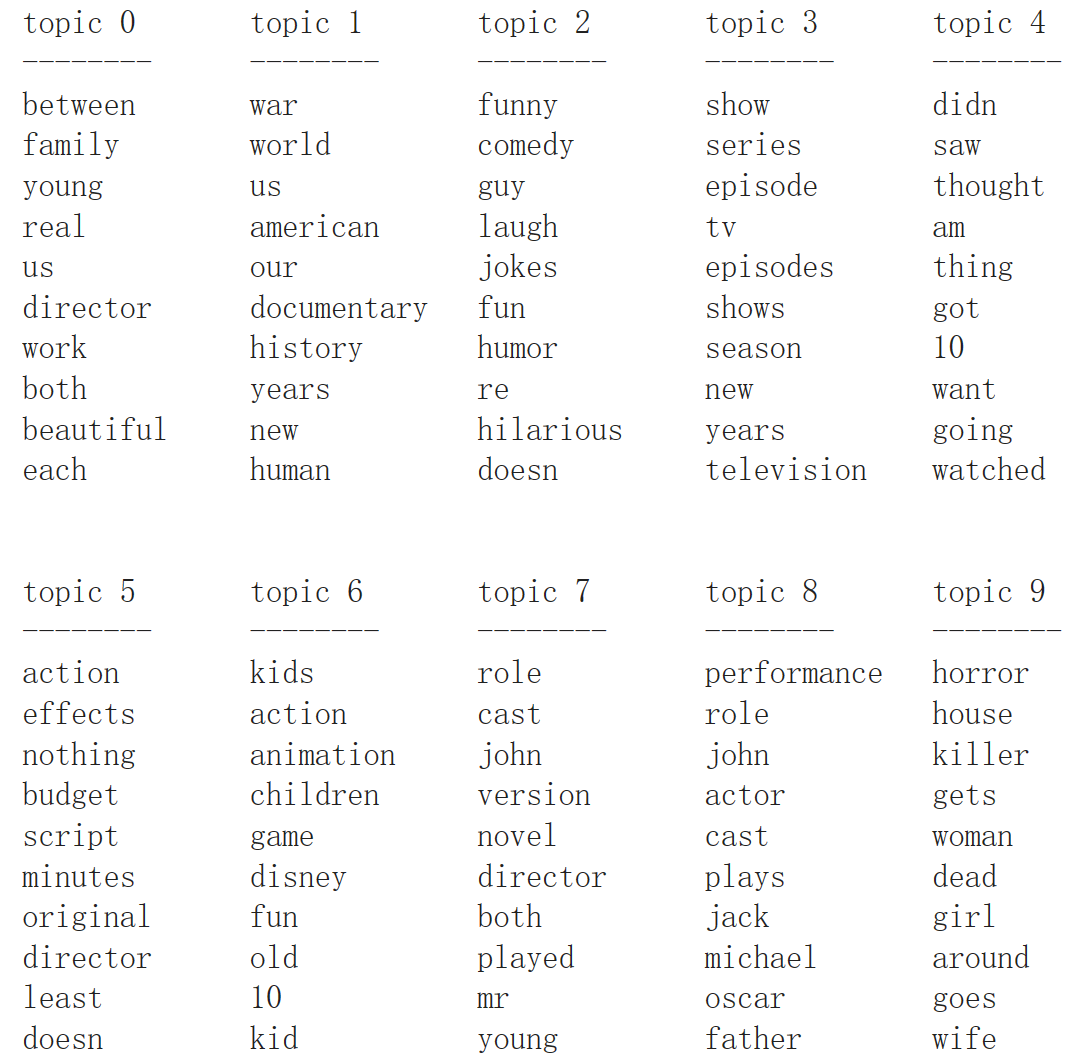
image-20230328014114480

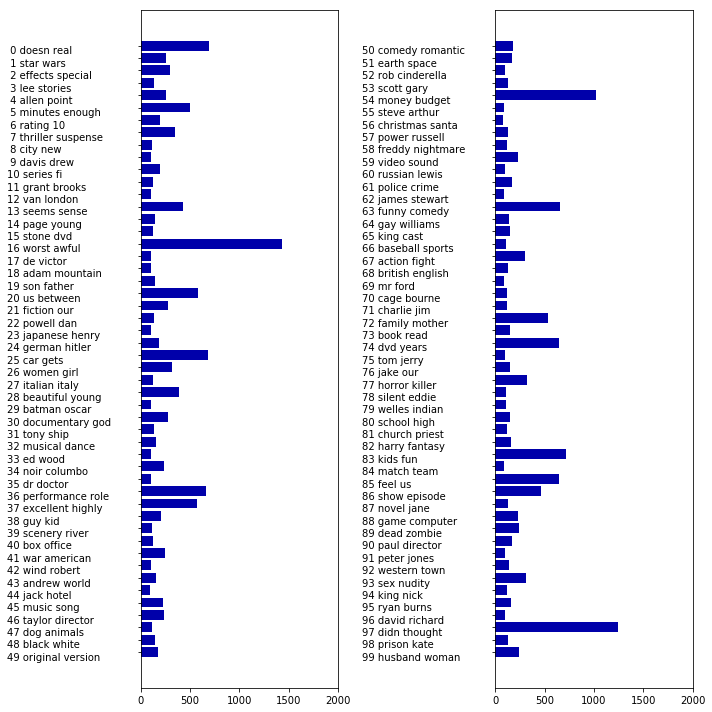
  • 查看主题的整体权重
fig, ax = plt.subplots(1, 2, figsize=(10, 10))
topic_names = ["{:>2} ".format(i) + " ".join(words)
               for i, words in enumerate(feature_names[sorting[:, :2]])]
# two column bar chart:
for col in [0, 1]:
    start = col * 50
    end = (col + 1) * 50
    ax[col].barh(np.arange(50), np.sum(document_topics100, axis=0)[start:end])
    ax[col].set_yticks(np.arange(50))
    ax[col].set_yticklabels(topic_names[start:end], ha="left", va="top")
    ax[col].invert_yaxis()
    ax[col].set_xlim(0, 2000)
    yax = ax[col].get_yaxis()
    yax.set_tick_params(pad=130)
plt.tight_layout()
下载 (1)